
Product Updates
Weekly updates to Fulcrum, always included with your subscription.
Thank you! Your submission has been received!
Oops! Something went wrong while submitting the form.

Archie can now look things up on the public web to answer your questions, on request. Reach out to your Launch, Account, or Support Team to enable this!
Archie's chatbot can now create items, jobs, vendors, purchase orders, customers, attachments, notes, corrective and preventive actions (CAPAs), nonconformance reports (NCRs), and work orders directly from a conversation, and confirms before creating a work order. It can also edit a job's materials, letting you preview, update, or remove them, and place a newly added job operation anywhere in the routing order, not just after an existing step.

On the Jobs page Scrap tab, hovering the name of the person who scrapped a part now shows when it was scrapped, in your shop's time zone.
Real Time Operations now shows the operation order number alongside each running operation.
Time Management gets a Download Production Timers for Import action that exports stopped Setup and Labor job time records with editable started/stopped date and time columns, so you can correct timers in bulk and import the results back in.
Jobs can now carry a configurable short code as part of their name.
An integrator's nesting software can now submit the nest it planned for a work order operation, and Fulcrum reconciles it the same way saving from the internal nest editor does.

A cost line's vendor now carries its currency code and lead time, so that information is available wherever the cost line is shown.
Purchase orders get an admin setting for whether payment terms and accounting codes are required, mirroring the existing Sales Setup pair. Each one can follow your accounting integration by default, or be set to always required or never required.
Purchase order PDFs can now combine duplicate line items instead of listing each one separately.
When received material is picked to a job and only part of it comes back to the shelf, the receipt couldn't be reverted at all. A new Revert Quantity action on the receiving page lets you revert just the quantity that's actually coming back.
Purchase Planning didn't know work orders existed, so it told you total demand for each job separately, forcing you to over-buy or make frustrating calls to the nesting manager. Now Purchase Planning looks at work orders, so if nesting lets you fit multiple jobs' parts on one sheet, Purchase Planning knows you only need to buy that one sheet.
Rolling out over the next few weeks. If you don't see it yet, it's coming.
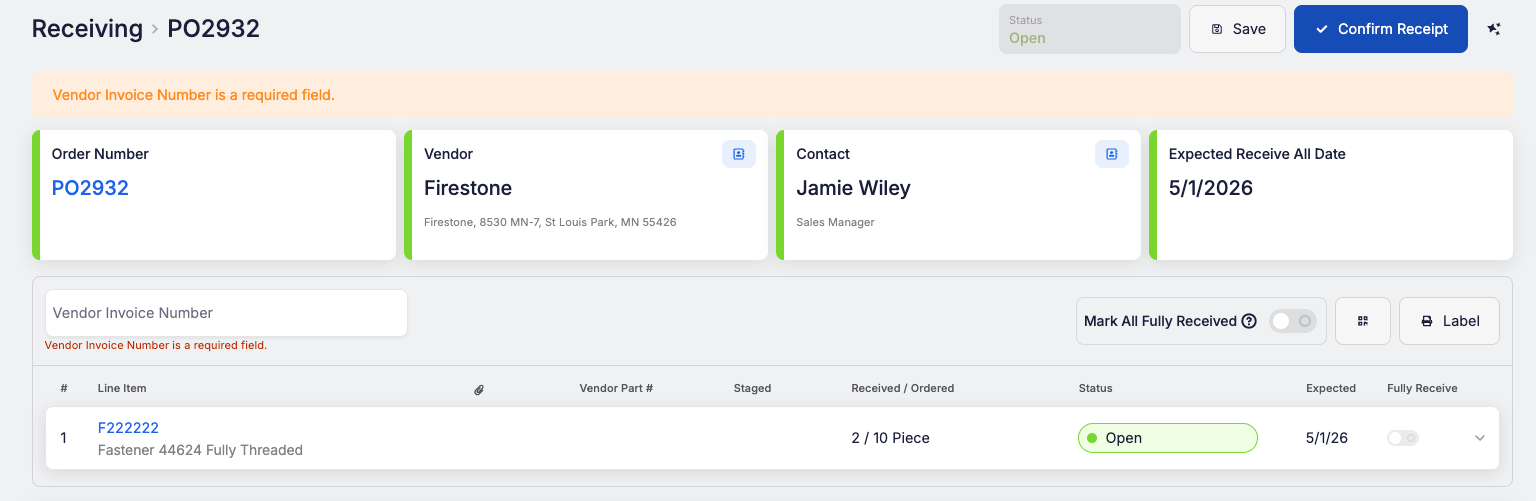
Receiving Settings has a new setting: Require Vendor Invoice Number (PO). When it's on, confirming receipt on a purchase order needs a vendor invoice number, and Fulcrum shows a message until you enter one. Saving doesn't require it, and customer-supplied receiving doesn't show the field at all.
 Share ->
Rolling a sales order line or a job to another revision of its item no longer requires a change order. A new Roll Revision entry on the sales order line's menu and the job's Update Options menu opens a dialog listing the item's other revisions and applies the roll in one step.
Change orders get an upgraded task list with reusable task templates and task groups, a header disposition field with a due date, new grid filters, and per-task notifications you can turn on or off.


