
Product Updates
Weekly updates to Fulcrum, always included with your subscription.
Thank you! Your submission has been received!
Oops! Something went wrong while submitting the form.

Archie used to only be able to read a running timer — the most common request was fixing a mistyped clock-in, and Archie had to turn it down. Archie can now create, correct, and delete time clock entries. This is off by default; ask your admin to turn it on.

While Archie is writing out a response, its send button turns into a stop button, in the chat panel and the fullscreen Archie page alike, so you're never stuck waiting out an answer you don't need anymore.

The material requirements report used to show raw-material weights in kilograms only — not much help if your shop thinks in pounds. Required, collected, and outstanding quantities now show in pounds right alongside kilograms.

Big CAD files that take a minute or two to open used to leave you staring at a bare spinner that looked broken. Loading now walks through stages: a quick spinner, rotating status messages, and a calm notice (with a Stop Waiting option) if it's still working, so a long load reads as progress instead of a stall.
Item, Receiving, and Packing labels can now print today's date automatically using a new template variable — Job Labels already had this. The date reflects your shop's own timezone, not the server's.
Archie can now add an operation to a job's routing, including an outside-processing step with vendor, cost, and lead time, even on jobs already underway. You'll always see a preview to confirm before anything is written.
A shop-floor supervisor can now mark a machine Out of Service, and bring it back, right from the Schedule page, no System Data access required. One less trip for the person who actually notices the machine is down.
The Job Tracker's status tabs (Ready, Running, Pending, Complete) now let you select more than one at a time. Pick any combination and the list shows everything across them, still ordered by scheduled date.
A new Compact toggle on the Job Tracker's operations list swaps the full-size cards for smaller, fixed-height ones — about 2.8x more operations fit on screen at once. It's a per-user setting that follows you across devices, built for shops running big monitors that could only show a handful of cards at a time.

You can now create a vendor credit as soon as a purchase order is Ordered, instead of waiting until it's Paid — matching how you can already log an order issue. No more waiting on a bill to be paid before acting on a vendor problem.
Ship Via on a purchase order is now a picker of your own shipping methods, not just the vendor's configured accounts — so if you just want to say "Our Truck," you don't have to set that up on every vendor first. A separate Shipping Account field sits right beside it, auto-filled from the vendor's matching account or typed in by hand, and a new prompt lets you save that arrangement back to the vendor when you want to.
Quote PDFs can now hide the grand total while still showing line-item pricing at different quantities — handy when you want the customer focused on picking a quantity and price without a bottom-line number anchoring the conversation. It sits right alongside the existing itemized-pricing option.
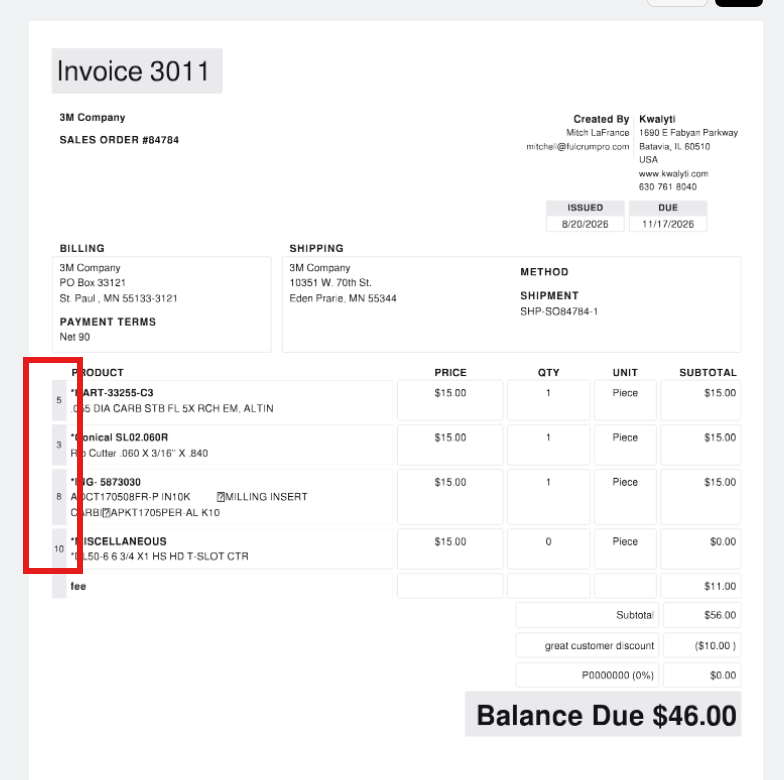
Invoices can now show the original sales order line's number instead of renumbering every invoice back to 1, 2, 3. So a partial invoice covering sales order lines 3, 5, and 8 shows exactly that: 3, 5, 8, on screen, on the PDF, and when adding lines from the sales order. It's a simple option to turn on, and it matches how packing slips already work.
 Share ->
Until now, a browser only picked up a new version when someone refreshed it — and shop-floor apps can stay open for weeks, missing updates in the meantime. Releases now reach the whole fleet within hours, with no interruption to work.
Raw HTML in a PDF's custom text or legalese used to render a link — but that trick only worked on quotes and sales orders. Now you can add a link without any HTML on any of Fulcrum's PDFs, from System Data → PDFs and Email.


