
Product Updates
Weekly updates to Fulcrum, always included with your subscription.
Thank you! Your submission has been received!
Oops! Something went wrong while submitting the form.

Creating a customer can now trigger a webhook and a notification, so your other systems (customer relationship management software, portals, onboarding checklists) hear about new customers right away instead of checking for them.
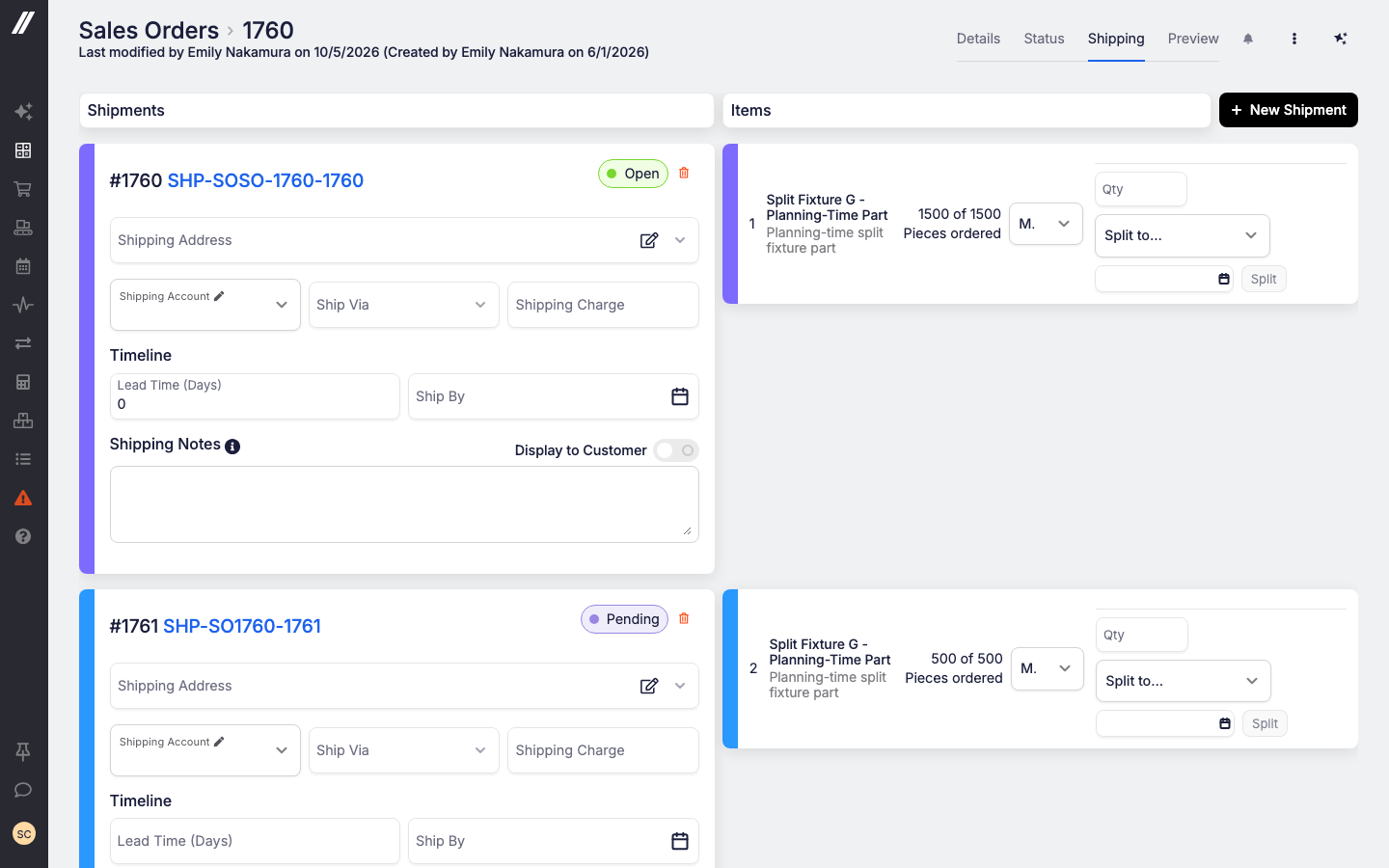
Part of a line is ready to go, the rest isn't. On the sales order's Shipping tab you can now carve off just the quantity you're ready to ship into a new or existing shipment, while the remainder stays scheduled for later. It stays one line on the order, with no extra lines and no second sales order.
Reach out to our support team or your account manager and we'll turn it on for your shop.
 Share ->
Quoting a single date for a whole order never matched reality when some lines were ready sooner than others. Capable-to-Promise now works line by line on quotes and sales orders. Choose which lines to include, set a priority for each one, see a date per line, spot when a date has gone stale, and look back through earlier runs.
Reach out to our support team or your account manager and we'll turn it on for your shop.

The Outside Processing Planning grid now requires the View Purchase Order permission, so someone who isn't allowed to see purchase orders can't read purchasing data out of the planning grid either.


Archie picked up a handful of new abilities: it can look up operation and work-center rates, search quote line items, filter items by exact item or customer, including searching by your customers' part numbers, receive purchase order lines, and re-price a sales order part line. It's also more careful: it now refuses a job material edit that would leave a routing step with nothing feeding it, and it no longer reports a blank name and due date back to you after creating a work order.

Previously a custom page made in Builder could only hand you a single-sheet workbook, so a report with a summary and three drill downs meant four separate downloads. A page can now build one workbook with a named tab per table, using the same cell and styling rules as before.
Edit System Data used to cover everything under System Data in one permission. Security settings, system API keys and integration settings now each have their own permission. Anyone who already had Edit System Data was grandfathered in, so nobody lost access on the way through. Creating and editing users outright is now limited to super users, and System Data settings and field types are each held to their own permission.

If you calibrate thread gages, there was nowhere to record what the gage actually is: the tool form asked for Range From and Range To for every tool type, and a gage stamped 1/4-20 UNC-2B GO/NOGO has no range.
Now the tool type decides which spec a tool carries. Fixed-size types (thread plug and ring gages, NPT plug and ring gages, plug and ring gages, set plugs, spline gages and attribute gages) get Size and Designation fields with their own tolerance and default units, while ranged types keep Range From and Range To.
The tools grid also shows the spec on its own line, and you can search it by range.
In the bill of materials and routing editor, opening an outside processing operation with Cost Option set to Per Unit showed each price break as a bare currency amount, without the unit of measure. Now each price carries the unit of measure of the item the operation belongs to, so an item with price breaks in inches displays those price breaks in inches.
If you run more than one company in Fulcrum, a purchase-order export used to leave you guessing which company placed the order. Both Excel downloads now tell you. Download Grid Results, and Download Lines and Receipts on both its PO Lines and Receipt Lines sheets, each end with a Company column holding the purchase order's company name. It's blank when the purchase order has no company. The on-screen grid is unchanged.
You can now set or change the vendor on an individual job operation, instead of having that decision locked in upstream.
A blanket order's releases rarely come out of the gate right the first time, and until now the ordered quantity on a release was greyed out, so you had to delete the release and build it again. You can now edit a release's quantity the same way you edit any other product line. If the releases stop adding up to the blanket line, the blanket line tells you. A defect where a release quietly threw away a quantity edit is fixed along with it.
A restricted-module IP allow-list entry can now name a whole network (for example a /24 or an IPv6 /56) as well as a single host or a wildcard, so something like an IPv6 kiosk can be admitted. A few smaller allow-list issues were fixed along the way.
Upload a spreadsheet to Archie, ask a question, get an answer, then ask the obvious follow-up. The last uploaded spreadsheet now stays readable for the rest of the session instead of Archie losing track of it.


