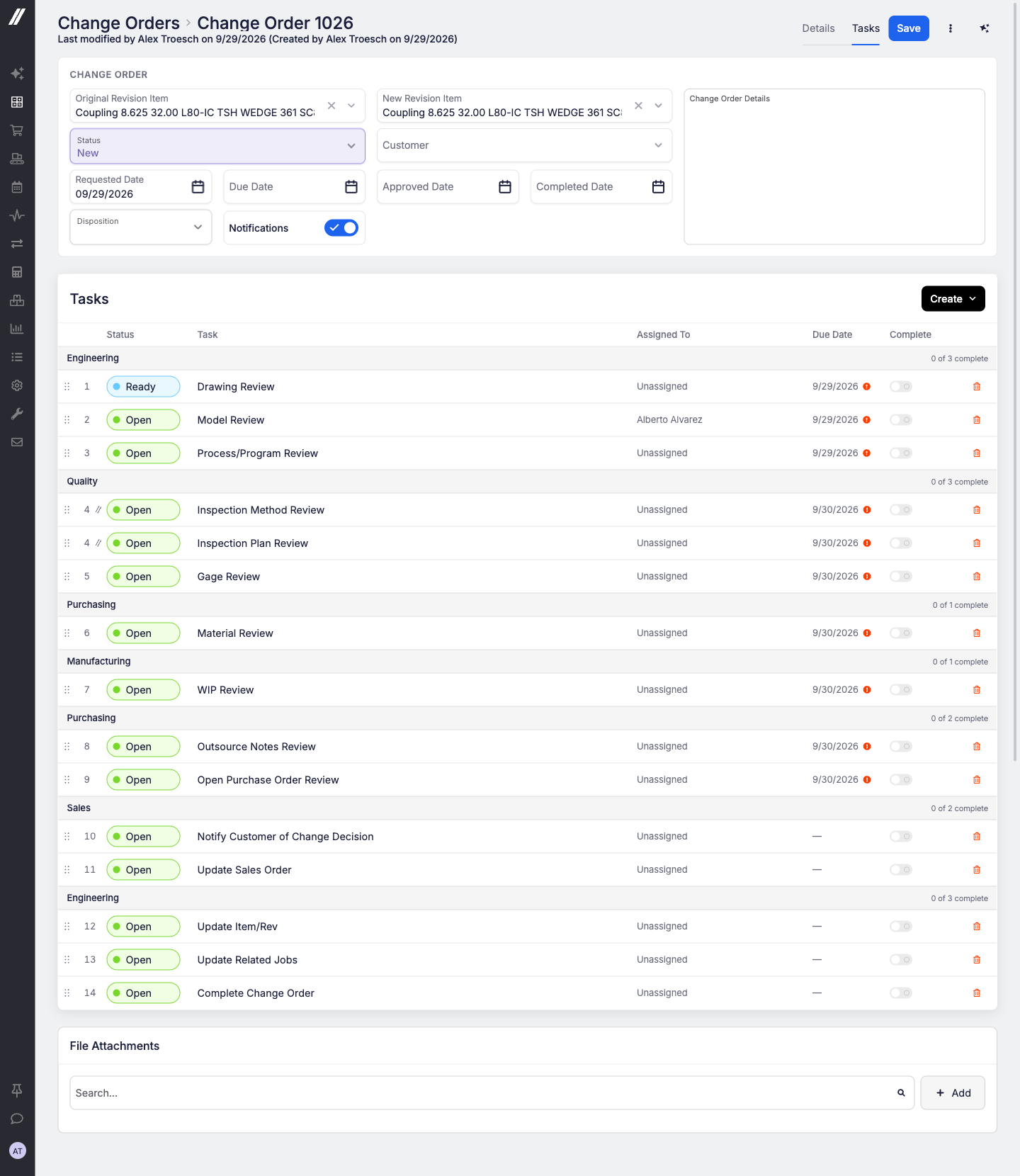
When a customer changes their mind mid-order, the work around that change (drawing review, engineering review, work-in-progress (WIP) review) can now run as a clear, step-by-step checklist right on the change order.
Tasks and templates
- Build task templates once, with steps, categories, default assignees and due days, then star one as the default so it's added to every new change order.
- Tasks run step by step, and tasks sharing a step run in parallel. The next step shows a Ready pill.
- A new Tasks grid shows your tasks across every change order, with open, overdue and due-today counts.
Notifications
- When a step is completed, the owners of the next step are notified by Email, Slack, Teams or Google Chat. Each change order has its own Notifications switch.
Easier to manage
- The change orders grid is rebuilt with sorting, filters, an Overdue switch, and it remembers your view.
- New header fields: Disposition and Due Date.
- One settings page at Admin > System Data > Change Orders holds task categories, templates, notification defaults and dispositions.
- Replacing a line now overwrites it in place on the new revision, so it keeps its line number and position.
- You can add a revision from a sales order line to an existing open change order.
- The audit log is now a full page, opened from the "Last modified by" subtitle.
- Change orders and their tasks are available through the public API.
Reach out to our support team or your account manager and we'll turn it on for your shop.