
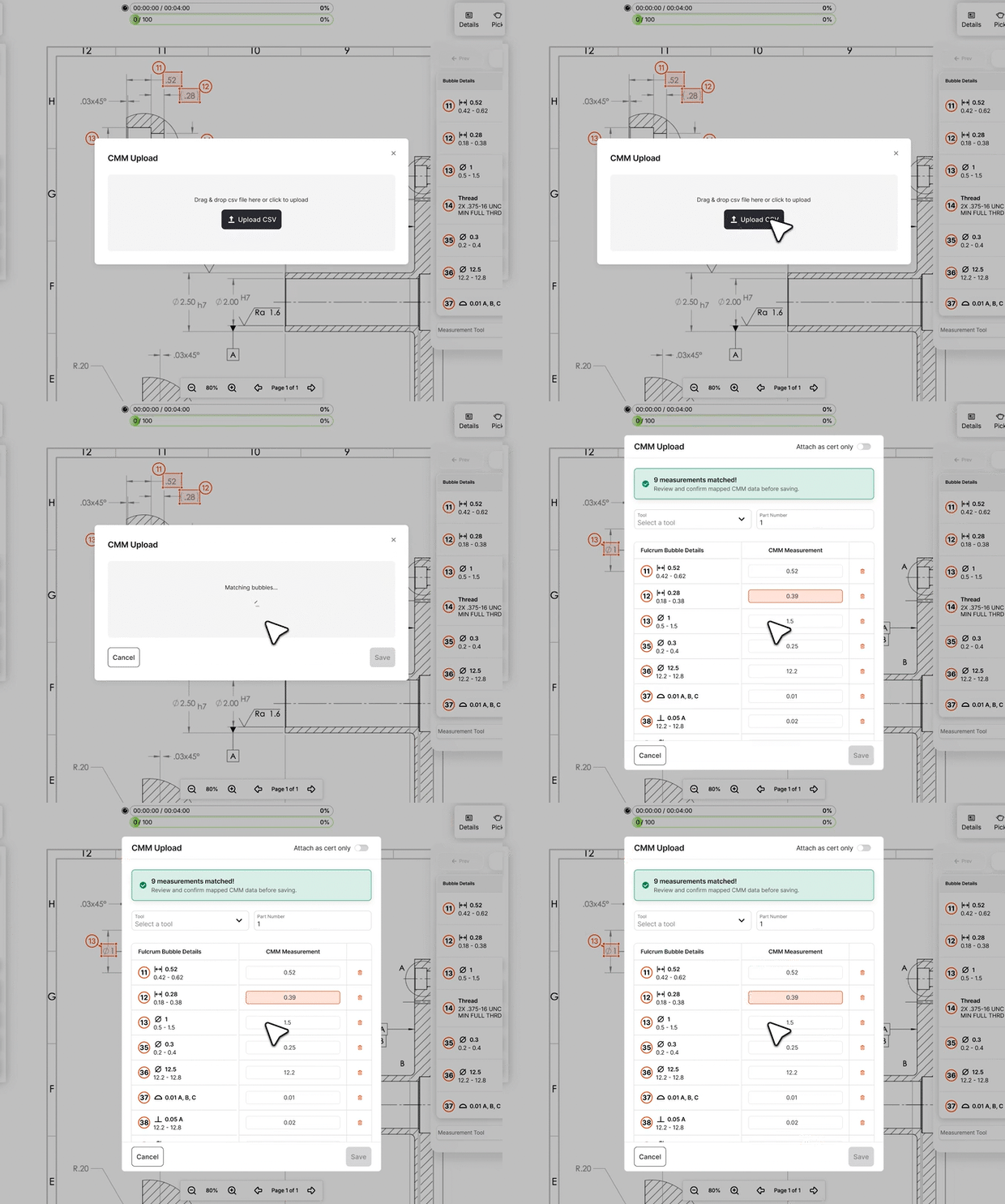
CMM reports already have the measurements your inspection plan needs. Now you can bring them into Fulcrum Control instead of re-entering them by hand.
WHY IT MATTERS
Getting CMM measurements into your inspection plan accurately is harder than it should be. Bubble numbers don't always align, nominal values need matching, and one bad mapping means bad data on the cert.
CMM imports in Fulcrum Control handle the mapping for you. Upload the CSV from your CMM, and Fulcrum matches each measurement to the corresponding bubble checkpoint on your inspection plan. If bubble numbers align, mapping is automatic. If they don't, Fulcrum matches on nominal value and tolerance. You review, confirm, and move on.
HOW IT WORKS
1. Run your CMM program and export the report as a CSV.
2. From your inspection operation (found in Job Tracking), open the In-Process tab.
3. Click the CMM Import button and upload your CSV file.
4. Fulcrum reads the bubble numbers and nominal values from the report and matches them to your checkpoints. If bubble numbers in the CMM program align with your inspection plan, mapping is automatic. If they don’t, Fulcrum matches on nominal value and tolerance.
5. Review the mapping. You can reassign any measurement that didn’t match correctly, or remove ones you don’t need.
6. Confirm the import. Measurements populate your tracking grid with the CMM recorded as the tool used.
WHAT’S INCLUDED IN BETA
• Single-part CMM import support
• Works with any CMM that exports CSV (Zeiss Calypso, Hexagon PC-DMIS, Mitutoyo, Keyence, and others)
• Auto-mapping to bubble checkpoints with manual override
• CMM tool recorded on each measurement for traceability
• Original CMM report viewable alongside imported data
• CMM data prints with your certification package
COMING NEXT
Multi-part / sample plan imports and saved mappings for repeat jobs are planned for V2. QIF export from the inspection plan directly to your CMM program is on the roadmap for V3.
If you’re an existing Fulcrum user interested in Control, let us know here and your Account Manager or Account Executive will reach out to you.
New to Fulcrum? Talk to Sales about how forward-thinking technology can improve your shop.
Get all the details about Control here.


