Landed cost auto-calculation used to spread fees evenly across every unit received. That works fine when items on a PO are similarly priced, but it can badly skew costs on mixed shipments — a $16,000 freight and duty bill spread across 16,500 items adds about $0.97 to every unit, whether that unit cost $2 or $200. Lower-cost parts end up over-costed while higher-cost parts get under-costed, throwing off inventory value and margin.
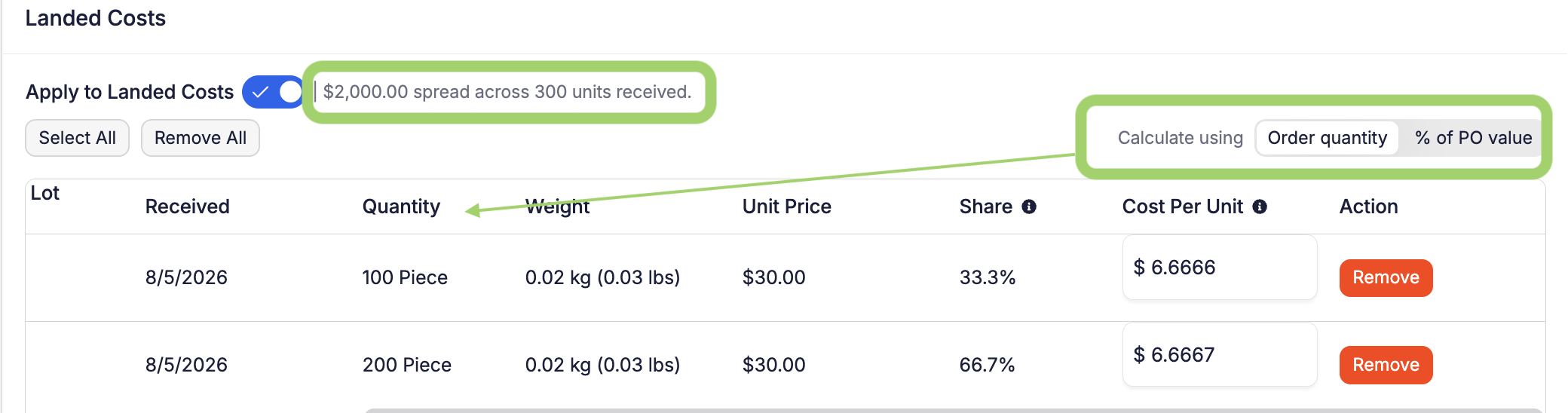
You can now choose how a landed-cost fee gets allocated. On a purchase order's landed-cost panel, "Calculate using" offers two options:
- Order quantity: the existing behavior, unchanged and still the default. Spread based on quantity received.
- % of PO value: each line receives a share of the fee proportional to its value.
A few guardrails:
- Manual per-item overrides still work with either allocation method.
- The panel now shows the fee amount being distributed, plus a Share column showing each selected line's percentage, so the basis is clear at a glance.
- The allocation method is saved with the fee, and reverting a receipt absorbs the cost back into the remaining lines using that same method.
- Nothing changes on existing purchase orders unless you change "Calculate using" and save the PO.