


Download PDF
Use Roadmap Builder to estimate and download your implementation timeline.
fulcrum Launch
Implementation Guide
A practical guide to implementing Fulcrum. This resource outlines the roles, data strategy, phases, and best practices that drive a successful launch and long-term adoption.
Resource Requirements
Who we need from you.
A successful implementation requires a committed team on your side. Below are the key roles required.
Role
Responsibility
Est. Time Commitment
Executive Sponsor
Strategic alignment, removing internal roadblocks, drives accountability

2 Hours / Month
Project Lead
The primary point of contact. Owns the timeline, coordinates internal teams, and drives accountability.
4-6 Hours / Week
Data Lead
Responsible for exporting legacy data and validating Fulcrum imports.
2+ Hours / Week
(Phase 2 only)
(Phase 2 only)
Functional Leads
Ops Manager, Department heads (Estimating, Sales, Purchasing, Shop Floor, Warehouse, Accounting) who attend specific sessions to validate their workflows.
1-2 Hours / Week
(as needed)
(as needed)

Note on Time Commitment
The time required for implementation will vary based on your team's role and the project's current stage. Anticipate that the necessary time commitment will increase as your team advances through each project phase.
Data Migration Strategy
Your current system determines how data is extracted, what formats are required, and how much validation is needed.

Platform-Specific Migration Paths
Timeline & Phases
Set your parameters to generate a custom implementation roadmap.
Implementation Phases
How your rollout unfolds over time.


PHASE 1
Define
Goal: Introduction to teams, understanding goals, and configuring the digital shop floor foundation.
Key Activities
- Kickoff and goal alignment.
- Digital Shop Configuration (Equipment, Work Centers, Operations, Departments).
- Preview your production flow in Fulcrum. Recreate a full bill of materials, routing and production process together.
ROLES INVOLVED
Executive Sponsor
Project Champion
Ops Manager


PHASE 2
Build
Goal: Extract, migrate, and validate the core data that drives your business and construct your workflows.
Key Activities
- Materials & Inventory: Cleaning and importing item masters and vendor lists.
- BOM & Routing: Constructing the recipes for your parts.
- Data Validation: Reviewing imported data for accuracy.
- Review and construct workflows from Quote to Cash.
ROLES INVOLVED
Project Champion
Data Lead
Engineering
Functional Leads


PHASE 3
Validate
Goal: Connect financial systems and other integrations. Stress-test Fulcrum workflows with real-world scenarios.
Key Activities
- Integrations: integration setup and mapping.
- Pilot Tests: Running 'Day in the Life' scenarios with key users to validate the end-to-end workflow.
ROLES INVOLVED
Finance/Accounting
IT
Shop Floor Leads
Project Champion
Functional Leads


PHASE 4
Launch
Goal: End-user training, cutover to production, and long-term adoption.
Key Activities
- Role-Based Training: Specific sessions by department
- Cutover: Transition to Fulcrum as the 'System of Record.' Open order and inventory data migration.
- Typically, 1-2 weeks of intensive support post Go-Live.
ROLES INVOLVED
All Teams
Onsite Training
Onsite visits are not required, but some companies choose to include in-person sessions.

Onsite visits can be coordinated directly with your Launch Manager and typically last two to three days, depending on your specific goals. While these visits most often occur during the 'Launch' phase to facilitate wider team training, an earlier visit can be valuable for assessing organizational complexity and tailoring the Fulcrum setup.

Flexible Timing
Can be scheduled for assessment early on, or training near Go-Live.
Strategic Agenda
We collaborate to establish a clear agenda beforehand to maximize our time together.
Change Management & Culture
Successful implementation isn't just about data and software — it's about people. Preparing your team for change is the single biggest predictor of long-term success.

Leadership Alignment
Your team will look to leadership to gauge how serious this change is. An Executive Sponsor must be visible, vocal, and active throughout the project.
Key Actions:
- Articulate the "Why" clearly to the entire company.
- Participate in key milestone reviews, not just the kickoff.
- Remove roadblocks for the implementation team.

Communication Strategy
Silence breeds anxiety. Keep the shop floor informed about what is coming, when it is coming, and how it benefits them personally.
Talking Points:
- "This will eliminate the paperwork you hate filling out."
- "We are investing in modern tools to make your job easier."
- "Your experience is needed to build this right."

The "J-Curve" of Change
Expect a temporary dip in productivity immediately after Go-Live. This is normal as people build muscle memory with the new system.
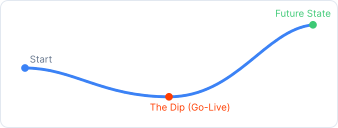
* Plan for reduced shop capacity during the first week of live production.

Psychological Safety
Team members may fear that automation puts their jobs at risk, or that they won't be able to learn the new tech. Address these fears head-on.
Empowerment Strategy:
- Identify "Super Users" early and give them extra training. They'll help the rest of the team.
- Celebrate small wins publicly during implementation.
- Make it safe to ask "stupid questions" without judgment.
Best Practices
The biggest indicators of a smooth, successful launch.

Meet Intentionally + Often
Avoid relying on weekly Launch calls for momentum. Meet with your team, internally, on a regular cadence to keep tasks and forward progress top of mind.

Document Current Process
Having a deep understanding of your current workflow, process requirements, roles and responsibilities is going to allow your Launch Manager to hit the ground running. Spend some time documenting this with your team before the “Build” phase.

Design the "Future State"
Do not customize Fulcrum to mimic your old software. Adapt your data, workflows, and communication based on Fulcrum’s best practices and where you want the business to go.

Clean Data First
Spend time scrubbing, removing duplicates, archiving stale data before migrating.

Extreme Ownership
Leadership should take a strong and consistent approach to staying organized, completing action items, and using the product week over week — a full-steam-ahead approach!

Create Buy In, Early
Instill awareness and excitement, from the beginning, across your business for all eventual users. Emphasize the value Fulcrum will bring to their day-to-day.

Leverage Resources
Take advantage of the many resources your Launch Manager provides you — Launch Pad, Loom, Scribe, Figma, Online Community — plenty of ways to get the information you’re looking for.
Ongoing Support
Free, unlimited support for life after you go live.

Dedicated Account Manager
Your personal advocate for strategy, new features, and ensuring long-term ROI.

Unlimited Support
Our support team is available via email to help with any questions you have, at no extra cost.

Fulcrum Online Community
Join our active community of manufacturers to see weekly product updates, share tips, tricks, and best practices with peers.

Included Forever
We don't charge for support or hourly help. Support is included with your subscription for life.